• Diễn đàn đang tiến hành nâng cấp, sáp nhập nên có thể bị gián đoạn trong một vài thời điểm. Bắt đầu từ 1/1/2026 diễn đàn sẽ hoạt động ổn định tại tên miền mới. Cảm ơn các bạn đã luôn đồng hành cùng diễn đàn.

New: WisBar Advance 2 ver 2.4.1.17 (04/01/2006) up hoài hết Cool rùi

wildcat nói:
Bác Chris_McKay cho WisBar Advance 2 update liên tục như gà đẻ trứng, oải quá đi, hết muốn là phần mềm Cool nữa rùi :D.

Here's what's new:
  • Enhancements
  • Added the ability to skin specific notification icons.

    Bugs Fixed
  • Corrected a crash that occurred when starting up the program.
  • Corrected some corruption that could occur in the start menu.
  • Fixed a bug where the control panel wouldn't launch from the start menu.
  • Fixed a bug where the expanded start menu settings would display the icons, even though the start menu icons were turned off.
  • Fixed a bug on WM5 phone devices where the program didn't recognize that a phone call had ended.
  • On WM5 devices, the polling of the clock was removed, thus freeing up more CPU cycles.
  • If an application is specifically trying to hide the ok/close button, WisBar now hides the button appropriately.
  • Fixed the rendering of disabled toolbar buttons.
A couple of notes on the skinning of notification icons: the settings for this are theme specific. That means you can find the settings under the "Customize Theme" area.

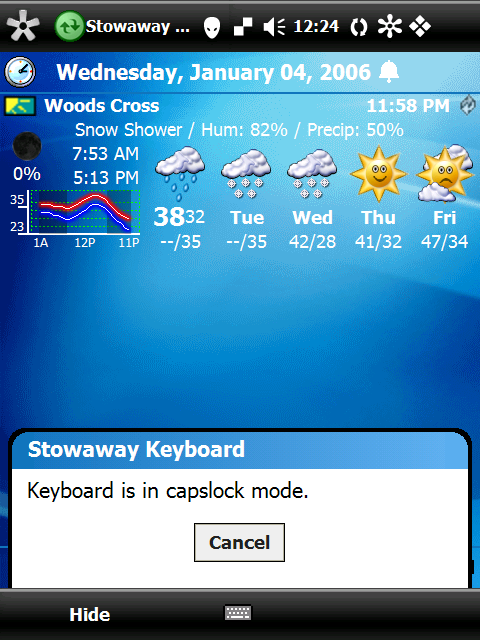
As of right now, the standard icons are gone, again. However, this time you can select a different icon for each notification. So, you can create an icon for your bluetooth headset or your Stowaway Keyboard, etc. Selecting an icon depends upon the title that appears in the notification bubble. For example, take the following image:
notification.png

If you'll notice, the title of the notification is Stowaway Keyboard. When selecting an icon through WisBar's settings program, you would specify a title of Stowaway Keyboard and then select the normal and pressed images for the button.

If there is no custom notification icon found, or if there are multiple pending notifications, the default notification icon provided with the skin will be used.

Download Links
Desktop Installer WM5 Users: I still can't guarantee that ActiveSync will pick the correct CAB file for installation while using this.
WM5 CAB File
WM2003/SE CAB File
PPC2002 CAB File
Có ...18 tiếp rồi các bạn nè!

http://www.lakeridgesoftware.com/forum/viewtopic.php?t=3579
 
giờ em nóng ruột đợi WM5 cho hx4700, còn thằng này đẻ hoài chắc cũng quên WM2003 rồi, đợi khi nó hết trứng up luôn đỡ mất công
 
Khiếp quá thôi, lại chiến dịch update, tết nhất đến rồi mà cứ làm các bản mới liên tục thế này thì hại anh em quá thôi..

Bản này chạy với WAD 1.0.0.5 em cảm thấy tốc độ tuyệt vời, không chê vào âdu được... không biết khi nào có bản chính thức các bác nhỉ... cứ beta mãi chán quá hì hì :D
 
Một số vá lỗi chính của bản WisBar Advance 2.4.1.20:

- Fixed a bug in the notification icon display.
- Fixed a crash that occurred when starting the program.
- Fixed a crash that occurred after ActiveSync was complete.
- Fixed a bug with the connection icon on WM2003SE and earlier devices.
- Fixed a bug where the start menu item size didn't scale correctly with larger fonts.
 
cho em hỏi 1 chút: Tại sao con PPC của em down WA2 về rồi, nhưng khi áp dụng skin thì chỉ có các thanh bar là thay đổi còn font màn hình ngoài thì vẫn giữ nguyên như cũ, làm thế nào để thay đổi font cho giống với skin, ngoài ra khi soft reset thì máy em lại trở lại như lúc chưa dung WA2, lạ thật :o
 
Chuyển theme itoday lại thành theme đi kèm với skin của WA2. Vào setting của WA2 đánh dấu cho chạy nó sau khi softreset..
 
thế còn cái background thì sao, tại sao nó cứ để mặc định là cái nền cũ nhỉ,có cách nào add skin mới mà có lun background ko??
 
nemchuaran87 nói:
thế còn cái background thì sao, tại sao nó cứ để mặc định là cái nền cũ nhỉ,có cách nào add skin mới mà có lun background ko??

Trong mỗi bộ skin cho WA2 đều có 1 file .TSK, chép file này vào My Documents. Sau đó, vào mục Today chọn cái theme mà bác vừa chép vào ấy thì tất cả sẽ đồng bộ thôi.
 
trên thanh taskbar của WA2 có cái meter battery và memory, bác nào biết tạo cái file bmp dộng đó bày em với, hihi, lấy ion của win XP cho qua, đang XP hóa cái PPC, các bác giúp đỡ em nhá ^_^
 

Đính kèm

  • bmp.PNG
    bmp.PNG
    12.9 KB · Lượt xem: 18
wildcat nói:
Bác Chris_McKay cho WisBar Advance 2 update liên tục như gà đẻ trứng, oải quá đi, hết muốn là phần mềm Cool nữa rùi :D.


2.4.1.17 (04/01/2006)


Here's what's new:


  • Enhancements
  • Added the ability to skin specific notification icons.


    Bugs Fixed
  • Corrected a crash that occurred when starting up the program.
  • Corrected some corruption that could occur in the start menu.
  • Fixed a bug where the control panel wouldn't launch from the start menu.
  • Fixed a bug where the expanded start menu settings would display the icons, even though the start menu icons were turned off.
  • Fixed a bug on WM5 phone devices where the program didn't recognize that a phone call had ended.
  • On WM5 devices, the polling of the clock was removed, thus freeing up more CPU cycles.
  • If an application is specifically trying to hide the ok/close button, WisBar now hides the button appropriately.
  • Fixed the rendering of disabled toolbar buttons.
A couple of notes on the skinning of notification icons: the settings for this are theme specific. That means you can find the settings under the "Customize Theme" area.

As of right now, the standard icons are gone, again. However, this time you can select a different icon for each notification. So, you can create an icon for your bluetooth headset or your Stowaway Keyboard, etc. Selecting an icon depends upon the title that appears in the notification bubble. For example, take the following image:

notification.png

If you'll notice, the title of the notification is Stowaway Keyboard. When selecting an icon through WisBar's settings program, you would specify a title of Stowaway Keyboard and then select the normal and pressed images for the button.

If there is no custom notification icon found, or if there are multiple pending notifications, the default notification icon provided with the skin will be used.

Download Links

Desktop Installer WM5 Users: I still can't guarantee that ActiveSync will pick the correct CAB file for installation while using this.
WM5 CAB File
WM2003/SE CAB File
PPC2002 CAB File


2.4.1.18 (17/01/2006)

  • Enhancements
  • Created a notification callback system for applications/plugins that want to receive certain system events and information.
  • The unexpanded control panel now groups the control panel applets appropriately.
  • Added an option to show the actual notification icon when there is one notification pending.


    Bugs Fixed
  • Fixed a bug where the custom notification icons settings screen would display the previous screen's settings.
  • The custom notification settings window now displays properly on square displays.
  • Fixed a bug where the close button in Solitaire disappeared on WM2003 devices.
  • Fixed a scrolling issue in the cascading start menu.
  • Fixed a bug where importing a theme to be customized could cause the settings program to lock up.
  • Reimplemented the "Only show multiple notifications" option.
  • The HP Protect Tools control panel applet is now supported on the unexpanded control panel.
Download Links
Desktop Installer Note for WM5 Users: Don't use this. Please use the CAB below.
WM5 CAB File
WM2003/SE CAB File
PPC2002 CAB File


em chỉ mê cái skin màu đen của bác này thôi , nhưng đến giờ lục lọi trên mạng vẫn chưa thấy , bác nó có cho em nha
ketnoitinhyeu@yahoo.com
 
Skin màu đen cho WA2 thì có rất nhiều, bác phải nói rõ tên của bộ skin nào thì anh em mới gửi tặng bác chứ.
 
Mấy cái link die hết rồi hay sao đó mí bác,em chịu ko down được:confused:
 
Trời mấy bác đào cổ vật từ 1 năm rưỡi nay lên để down ver cũ rích đó sao? Vào 4share tìm kiếm với từ khoá Wisbar Advance 2 là có ver mới nhất và cái ấy.
 
Back
Top