Máy tôi cài Vista Ultimated, Outlook 2007, Khi gửi mail đi thì không vấn đề gì
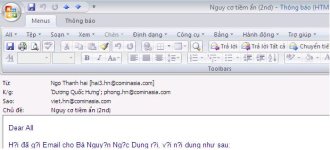
Nhận mail của người khác gửi đến, nếu gõ theo bảng mã Unicode tổ hợp thì OK, đọc bình thường. Gõ theo bảng dựng sẵn thì kết quả như sau:
View attachment 12549
Đặc biệt là thư mình gửi đi, khi người nhận Reply lại cũng bị vỡ fonts i chang.
Máy anh bạn bên cạnh WinXP SP2 Office 2003 cũng bị tình trạng tương tự.
Chẩn đoán sơ bộ là do các thiết đặt của Outlook. nhưng khi đặt lại trong Mail format cũng không thấy cải thiện gì cả.
Mong các bác chỉ bảo cho
Thử làm cách này xem :
Outlook XP will ignore the algorithm by which it decides to change the encoding of text and can also be set to consistently follow a single specification. There is no interface provide for this, though, and can only be implemented through a registry setting.
Note that making mistakes in the registry is generally not a good thing. It is possible to make a mistake which will render a system useless.
Follow the guidelines for registry editing in MSKB article "256986 Description of the Microsoft Windows Registry"
1. Close Outlook and go to the Start menu and click on run. Type regedit and click OK to open your registry editor.
2. Look for the registry key
HEY_CURRENT_USER\Software\Microsoft\Office\10.0\Outlook\Options\Mail
(If you are using Outlook 2003, change the 10.0 to 11.0)
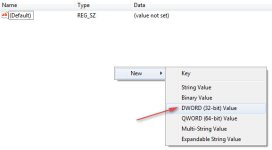
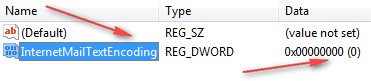
3. If the DWORD value InternetMailTextEncoding doesn't exist, create it.
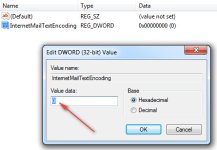
4. The following values change Outlook XPs behavior in this fashion (from MSKB article 278134," OL2002: How Outlook Applies Encoding to Plain Text Messages")-
If the value data is 0, Outlook is set to Encode Intelligently.
If the value data is 1, Outlook uses Quoted-Printable encoding.
If the value data is 2, Outlook uses Base 64 encoding.
If the value data is 3, Outlook uses no encoding and leaves 8-bit characters as 8-bit characters.
Setting the value to 3 will ensure that no encoding will be applied to messages composed in plain text. This will allow your posts to Freelists to remain clean of unwanted characters.
5. Exit the registry editor and open Outlook and your problem should be solved.
Chúc thành công.~X(