

Bác Chris_McKay cho WisBar Advance 2 update liên tục như gà đẻ trứng, oải quá đi, hết muốn là phần mềm Cool nữa rùi  .
.
2.4.1.17 (04/01/2006)
Here's what's new:
As of right now, the standard icons are gone, again. However, this time you can select a different icon for each notification. So, you can create an icon for your bluetooth headset or your Stowaway Keyboard, etc. Selecting an icon depends upon the title that appears in the notification bubble. For example, take the following image:
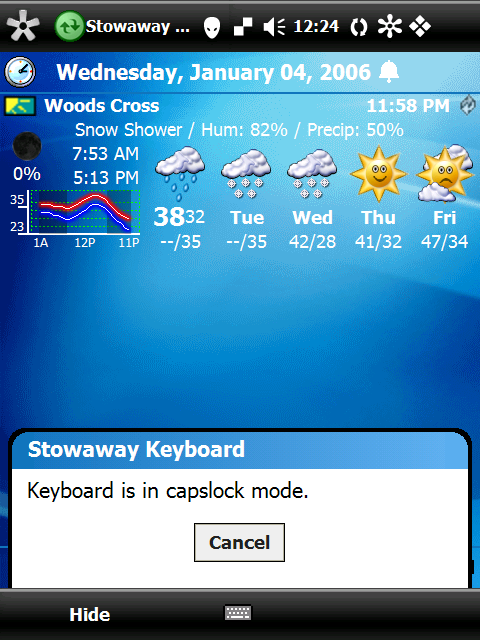
If you'll notice, the title of the notification is Stowaway Keyboard. When selecting an icon through WisBar's settings program, you would specify a title of Stowaway Keyboard and then select the normal and pressed images for the button.
If there is no custom notification icon found, or if there are multiple pending notifications, the default notification icon provided with the skin will be used.
Download Links
Desktop Installer WM5 Users: I still can't guarantee that ActiveSync will pick the correct CAB file for installation while using this.
WM5 CAB File
WM2003/SE CAB File
PPC2002 CAB File
2.4.1.18 (17/01/2006)
Desktop Installer Note for WM5 Users: Don't use this. Please use the CAB below.
WM5 CAB File
WM2003/SE CAB File
PPC2002 CAB File
.2.4.1.17 (04/01/2006)
Here's what's new:
- Enhancements
- Added the ability to skin specific notification icons.
Bugs Fixed - Corrected a crash that occurred when starting up the program.
- Corrected some corruption that could occur in the start menu.
- Fixed a bug where the control panel wouldn't launch from the start menu.
- Fixed a bug where the expanded start menu settings would display the icons, even though the start menu icons were turned off.
- Fixed a bug on WM5 phone devices where the program didn't recognize that a phone call had ended.
- On WM5 devices, the polling of the clock was removed, thus freeing up more CPU cycles.
- If an application is specifically trying to hide the ok/close button, WisBar now hides the button appropriately.
- Fixed the rendering of disabled toolbar buttons.
As of right now, the standard icons are gone, again. However, this time you can select a different icon for each notification. So, you can create an icon for your bluetooth headset or your Stowaway Keyboard, etc. Selecting an icon depends upon the title that appears in the notification bubble. For example, take the following image:
If you'll notice, the title of the notification is Stowaway Keyboard. When selecting an icon through WisBar's settings program, you would specify a title of Stowaway Keyboard and then select the normal and pressed images for the button.
If there is no custom notification icon found, or if there are multiple pending notifications, the default notification icon provided with the skin will be used.
Download Links
Desktop Installer WM5 Users: I still can't guarantee that ActiveSync will pick the correct CAB file for installation while using this.
WM5 CAB File
WM2003/SE CAB File
PPC2002 CAB File
2.4.1.18 (17/01/2006)
- Enhancements
- Created a notification callback system for applications/plugins that want to receive certain system events and information.
- The unexpanded control panel now groups the control panel applets appropriately.
- Added an option to show the actual notification icon when there is one notification pending.
Bugs Fixed - Fixed a bug where the custom notification icons settings screen would display the previous screen's settings.
- The custom notification settings window now displays properly on square displays.
- Fixed a bug where the close button in Solitaire disappeared on WM2003 devices.
- Fixed a scrolling issue in the cascading start menu.
- Fixed a bug where importing a theme to be customized could cause the settings program to lock up.
- Reimplemented the "Only show multiple notifications" option.
- The HP Protect Tools control panel applet is now supported on the unexpanded control panel.
Desktop Installer Note for WM5 Users: Don't use this. Please use the CAB below.
WM5 CAB File
WM2003/SE CAB File
PPC2002 CAB File


