Cho em hỏi về vista aero!

phai bam to hop phim windows+tap thi no moi hien ra a? khi buong ra no lai mat, co cach nao lam cho luc nao no cung hien thi khong?

 
phai bam to hop phim windows+tap thi no moi hien ra a? khi buong ra no lai mat, co cach nao lam cho luc nao no cung hien thi khong?

Muốn khi nhấn và nhả ra nó không mất bạn ấn thêm phím Ctrl nữa là được.

Ctrl + windows + Tab

Chúc vui :D
 
Bác nào kiếm được "Blissful Dream" chia sẻ cho em với, cái đấy đẹp nhưng nó bắt mua $9 đểu thể.
 
Anh em nào có Dream " ngon ngon " thi post lên đây cho a e chia sẻ(tất nhiên là không phải mấy cái Dream ở trang WinCustomize.com nhé).:D
 
Xem link mình đã post tại trang 6 đấy, có một số mẫu trông cũng được đấy chứ bạn :D

Link
 
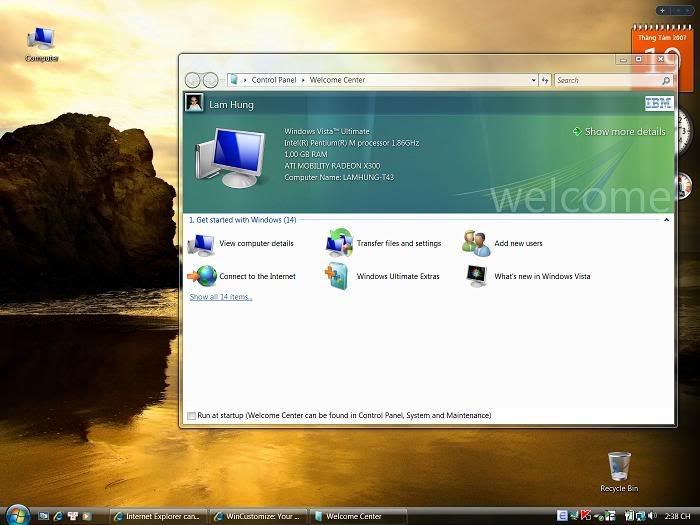
Con T43 của em card rời 64M mà vẫn chạy Aero ngon các bác ạ

Con của em là T43 2668-46U, cấu hình là:
- Tốc độ 1.86 Ghz
- Bộ nhớ ngoài DDRam II 1GB
- Card màn hình 64 Mb ATI Mobility Radeon X300

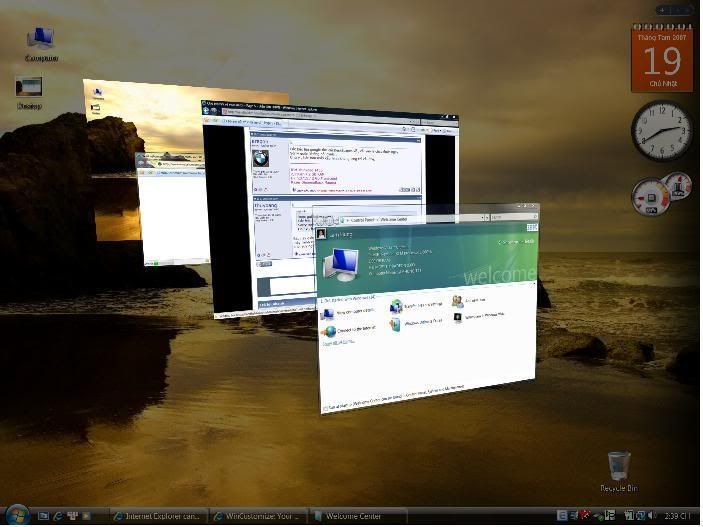
Em cài bản Untimate nó lên giao diện Aero ngay:

Destop.jpg


Aero.jpg


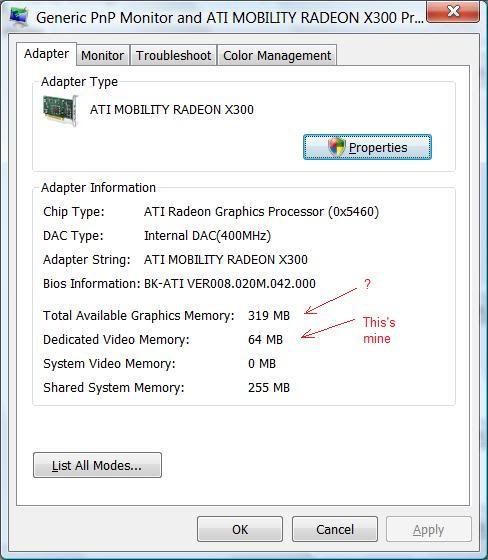
Lúc xem lại adapter thì thấy nó báo Total available graphics memory là 319MB??? card rời mà lại share được Ram à? Bác nào giải thích hộ em với?

Displaymemory.jpg
 
Đang test cách xài DreamScene trên HOme Premium. Trên các trang web nước ngoài đã hướng dẫn rồi.

Nếu thành công sẽ post lên nhá
 
Đang test cách xài DreamScene trên HOme Premium. Trên các trang web nước ngoài đã hướng dẫn rồi.

Nếu thành công sẽ post lên nhá


Xin Chào bạn.BẠn có kinh nghiệm về cài DreamScence trên Vista Home Pre hok hướng dẫn giúp mình với.??Mình cũng đang dùng Vista Home Pre( nhưng không phải là bản Tiếng Anh mà là bảnTiếng Nhật vì máy mình xách tay từ bên Nhật về).Mình đã thử nhưng vẫn chưa cài đặt dc??
Y/M của mình là: Adidas_boy8x@yahoo.com.Có gì cứ Chat trực tiếp với mình.

Mong sớm nhận được tin của bạn.Mình cảm ơn
 
Xin Chào bạn.BẠn có kinh nghiệm về cài DreamScence trên Vista Home Pre hok hướng dẫn giúp mình với.??Mình cũng đang dùng Vista Home Pre( nhưng không phải là bản Tiếng Anh mà là bảnTiếng Nhật vì máy mình xách tay từ bên Nhật về).Mình đã thử nhưng vẫn chưa cài đặt dc??
Y/M của mình là: Adidas_boy8x@yahoo.com.Có gì cứ Chat trực tiếp với mình.

Mong sớm nhận được tin của bạn.Mình cảm ơn

Bạn xem bài số 65 trang 7 của bạn vuitinh_hp, mình test rồi, ok!
 
Bạn xem bài số 65 trang 7 của bạn vuitinh_hp, mình test rồi, ok!


Bác tuanhauve hình như đọc chưa kỹ bài của mình.Khônng biết máy bác chạy cái Dreamscence ntn,nhưng máy mình(là hàng made in Japan,đang chạy trên Windows Vista Pre = Tiếng NHẬT).Mình gặp 1 số lỗi ,nhưng vì =tiếng Nhật nên ko biết là lỗi gì?

1.Thứ Nhất là:khi mình tiến hành làm theo trong hướng dẫn(theo như bài cua bác Vuitinh_hp ở trang 7) thì khi làm đến bươc 4 "Copy this patched version of themecpl.dll to %windir%\system32" thì máy của mình không cho copy.
Hoăc " Rename the file themecpl.dll in %windir%\system32 to themecpl.dll.original" cũng không dc.


2.Thứ 2 là khi cài bản DreamScence(offline) theo Link của bác Vuitinh_hp gửi thì(vì Windows Vista Pre kể cả khi đã Update Online thĩ cũng vẫn chưa có DreamScence) thì lúc chuẩn bị chạy Setup thì máy hiện lên thông báo lỗi j đó,rồi bắt Exit.

Nếu cần thì mình có thể chụp hình cái lỗi đấy để post lên đây cho bạn xem.

Tiếc quá mình ở Hanoi ,chứ nếu không mình mang máy đến tận nơi để Tuanhauve xem hộ..
 
Hơi muộn nhưng mới cài được Dreamscenne trên máy mình (HomeOpre) chia xẻ vậy. Nói thật hơi tùm lum vì mình cũng dốt nên làm đại may mà được:

Nguyên văn Tieng anh bạn nào coi nhanh hơn , chứ mình dịch cũng lởm lắm:

Hack to install Windows DreamScene in non-Ultimate Vista

1. Download the patched DreamScene dll files package NonUltimateDreamScene.zip (http://www.box.net/shared/5xamyszag7)
2. Unpack the archive content to a folder.
3. Right click on InstallDreamScene.bat and select “Run as Administrator” to install Windows DreamScene on your non-Ultimate version of Vista. Answer “Y” to continue. You can also open elevated command prompt with administrator rights and type InstallDreamScene.bat to execute the batch script.
4. Restart your computer.

Note: Apparently you can still download the patched version of DreamScene somewhere, however, most is offering incorrect version of install script, which was fixed in second edition. If you encounter problem, simply follow manual method below. Non-English version try to install English language pack. Please provide feedback at the forum or comment.

Voila, your system now will run DreamScene without paying hefty Ultimate price. If you prefer to manually to install the patched DreamScene DLL files, here’s the step-by-step guide:

1. Download the patched DreamScene files as above and unpack to a folder.
2. Copy DreamScene.dll to %WinDir%\System32\ folder.
3. Copy DreamScene.dll.mui to %WinDir%\System32\en-US\ folder.
4. In Windows Explorer, navigate to %WinDir%\System32\ folder.
5. Right click on themecpl.dll file, and click on Properties on right click menu.
6. Select the Security tab, then click Advanced.
7. Subsequenly select the Owner tab, click Edit button. Press Continue (or log in if you’re not Administrator) on any User Access Control prompt.
8. Select your Vista logon user name, then click OK button. Then click OK in any dialog window that pops up, and press OK again at Advanced Security Settings window.
9. On Security tab, click the Edit button. Press Continue (or log in if you’re not already an Administrator) on User Access Control prompt.
10. Click Add button, and click on Advanced button. Next press Find Now button, and then select your logged on user name. Press OK when done.
11. Click OK again on Select Users or Groups dialog.
12. On Permissions for themecpl.dll window, highlight your user name, and check the box next to “Full Control” under “Allow” column. Hit OK when done, and confirm any message. Click OK twice to exit from ownership taking process.
13. Rename the file themecpl.dll in %WinDir%\System32 to themecpl.dll.original.
14. Copy the patched version of themecpl.dll to %WinDir%\System32\ folder.
15. Repeat step 4 - 12 on themecpl.dll.mui file located in %WinDir%\System32\en-US\ folder.
16. After taking ownership, rename the file %WinDir%\System32\en-US\themecpl.dll.mui to themecpl.dll.mui.original.
17. Copy the patched version of themecpl.dll.mui to %WinDir%\System32\en-US\ folder.
18. Create a new folder in %windir%\Web named “Windows DreamScene” (without quotes). This is the location to place all your videos want to set as DreamScene wallpaper, and can be easily configured via Control Panel Personalization applet.
19. Lastly, import and merge DreamScene.reg to registry.
20. Reboot computer.

Using DreamScene

After patching, right click on any blank space on Desktop, select “Personalize”, then click on “Desktop Background”. Under location, select “Windows DreamScene Content”, and then select a animated video you want.
 
Tuy nhiên phần tự động có thể kg chạy, vì nhiều lý do khác nhau Như máy mình cũng kg đươc vì đã update Vista full => làm tay thep như hướng dẫn ơ trên

1. Down cái crck về giai nén
2. Copy DreamScene.dll vào thư mục: %WinDir%\System 32\ .
3. Copy DreamScene.dll.mui vào thu mục %WinDir%\System 32\en-US\
4. Bây giờ vào đườn dẫn này %WinDir%\System 32\.
5. chuột phải để bật properties của file: themecpl.dll
6. Chọn Security tab, và click Advanced.
7. Chuyển sang the Owner tab, click Edit button. Press Continue (nếu bạn kg là ADmin thi phải logg in admin mới làm được thao tác này) on any User Access Control prompt.
8. Chọn Vista user name đang nhập của mình , click OK button. Then click OK in any dialog window that pops up, and press OK again at Advanced Security Settings window.
9. On Security tab, click the Edit button. Press Continue (or log in if you’re not already an Administrator) on User Access Control prompt.
10. Click Add button, and click on Advanced button. Next press Find Now button, and then select your logged on user name. Press OK when done.
11. Click OK again on Select Users or Groups dialog.
12. On Permissions for themecpl.dll window, highlight your user name, and check the box next to “Full Control” under “Allow” column. Hit OK when done, and confirm any message. Click OK twice to exit from ownership taking process.
13. Rename the file themecpl.dll in %WinDir%\System 32 to themecpl.dll.or iginal.
14. Copy the patched version of themecpl.dll to %WinDir%\System 32\ folder.
15. Repeat step 4 - 12 on themecpl.dll.mu i file located in %WinDir%\System 32\en-US\ folder.
16. After taking ownership, rename the file %WinDir%\System 32\en-US\themecpl.dll .mui to themecpl.dll.mu i.original.
17. Copy the patched version of themecpl.dll.mu i to %WinDir%\System 32\en-US\ folder.
18. Create a new folder in %windir%\Web named “Windows DreamScene” (without quotes). This is the location to place all your videos want to set as DreamScene wallpaper, and can be easily configured via Control Panel Personalization applet.
19. Lastly, import and merge DreamScene.reg to registry.
20. Reboot computer.


(mai dịch típ ..bùn ngủ wá ...sỏyy) bạn nào khá ENllissh là làm được ngay. tớ làm rồi. Côl lắm. Có gì mai tớ wai lạy làm kỹ hơn
 
Bác tuanhauve hình như đọc chưa kỹ bài của mình.Khônng biết máy bác chạy cái Dreamscence ntn,nhưng máy mình(là hàng made in Japan,đang chạy trên Windows Vista Pre = Tiếng NHẬT).Mình gặp 1 số lỗi ,nhưng vì =tiếng Nhật nên ko biết là lỗi gì?

1.Thứ Nhất là:khi mình tiến hành làm theo trong hướng dẫn(theo như bài cua bác Vuitinh_hp ở trang 7) thì khi làm đến bươc 4 "Copy this patched version of themecpl.dll to %windir%system32" thì máy của mình không cho copy.
Hoăc " Rename the file themecpl.dll in %windir%system32 to themecpl.dll.original" cũng không dc.


2.Thứ 2 là khi cài bản DreamScence(offline) theo Link của bác Vuitinh_hp gửi thì(vì Windows Vista Pre kể cả khi đã Update Online thĩ cũng vẫn chưa có DreamScence) thì lúc chuẩn bị chạy Setup thì máy hiện lên thông báo lỗi j đó,rồi bắt Exit.

Nếu cần thì mình có thể chụp hình cái lỗi đấy để post lên đây cho bạn xem.

Tiếc quá mình ở Hanoi ,chứ nếu không mình mang máy đến tận nơi để Tuanhauve xem hộ..

Bạn chú ý đọc và làm đúng theo file hướng dẫn là sẽ ok: các bước copy và rename bạn phải thực hiện trong tài khoản quản trị. Khi mình làm xong thì trong lựa chọn Desktop background có tùy chọn Dream Scene content, mình phải down các file video của dreamscene riêng về để chạy chứ vẫn không lấy được từ Windows Updater.

Ah, quên nữa, nhớ phải bật Aero lên. Và muốn vào tài khoản quản trị thì từ tài khoản mặc định bấm Win logo + R , gõ "Net user administrator /active:yes" rồi log-off sẽ thấy cả 2 tài khoản.
 
Bạn chú ý đọc và làm đúng theo file hướng dẫn là sẽ ok: các bước copy và rename bạn phải thực hiện trong tài khoản quản trị. Khi mình làm xong thì trong lựa chọn Desktop background có tùy chọn Dream Scene content, mình phải down các file video của dreamscene riêng về để chạy chứ vẫn không lấy được từ Windows Updater.

Ah, quên nữa, nhớ phải bật Aero lên. Và muốn vào tài khoản quản trị thì từ tài khoản mặc định bấm Win logo + R , gõ "Net user administrator /active:yes" rồi log-off sẽ thấy cả 2 tài khoản.


Anh TuanHauve đúng là Pro.Anh đã bắt đúng mạch cho cái bệnh của máy em.Xin chia sẻ với a e là em đã cài dc DreamScence trên Windows Vista Hoem Pre.Nhưng: ( lại là từ Nhưng :mad: )

Khi em cài phần mềm DeskScapes để chạy những file *.dream thì nó bảo chỉ cài đươc trên Vista Ultimate,thế nên hiện giờ máy em mới chỉ xài được DreamScence = những file WMV.

Anh làm ơn giúp em nốt cái vụ này.Em xin trân thành cảm ơn!!:)
 
Hic..Hicc..Giúp em với.Mấy hôm nay em khổ vì cái này quá trời luôn..
Mem nào biết thì hướng dãn sớm cho thằng em cái..Em cảm ơn nhiều..!!
 
Mình có 2 con Lap, 1 HP và 1 Acer cấu hình cả 2 con đều ngang nhau nhưng con HP chạy aero thì ngon lành còn acer thì bó tay
 
Bạn vào thẳng mycomputer update toàn bộ phần Windows Experience Index
sau rồi vào Update score phần tính điểm máy của bạ cao thì mình nghĩ là máy của bạn sẽ ok thôi
 
Mình không biết trang Web nào để download free mấy cái file WMV hoặc MPEG (Chú Ý:Các File có chất lượng hình ảnh thật đẹp) để dùng làm hinh nền trong DreamScence cho Windows Vista. Bạn nào biết thì làm ơn chỉ giúp cho anh em.Xin cảm ơn trước nhé!!:D

(Vì Mình đang chạy DreamScence trên Vista Home Pre nên không chạy được những file có đuôi .dream ở trang www.Wincustomize.com).
 
Mình không biết trang Web nào để download free mấy cái file WMV hoặc MPEG (Chú Ý:Các File có chất lượng hình ảnh thật đẹp) để dùng làm hinh nền trong DreamScence cho Windows Vista. Bạn nào biết thì làm ơn chỉ giúp cho anh em.Xin cảm ơn trước nhé!!:D

(Vì Mình đang chạy DreamScence trên Vista Home Pre nên không chạy được những file có đuôi .dream ở trang www.Wincustomize.com).

Đây là trang HDVideo của Microsoft, chuẩn High Definition Quality dùng làm dream scene rất đẹp! Chú ý là file exe đóng gói zip tự chạy, khi down xong gọi file này lên, nó sẽ hỏi unzip vào 1 thư mục do bạn chọn. Tốc độ down hơn 200KB/s.

http://www.microsoft.com/windows/windowsmedia/musicandvideo/hdvideo/contentshowcase.aspx
 
Back
Top