
You are using an out of date browser. It may not display this or other websites correctly.
You should upgrade or use an alternative browser.
You should upgrade or use an alternative browser.
Hiện cái cảnh báo này là máy em bị cái gì a?
- Thread starter DHL
- Ngày gửi
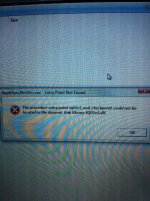


Lỗi phát sinh do file SQLite3.DLL bị lỗi, có thể do nhiều nguyên nhân. Bác vào đây tải file SQLite3.DLL về và làm theo hướng dẫn sau nhé :
Open the zip-file you downloaded from DLL-files.com.Extract sqlite3.dll to a location on your computer. We recommend you to unzip it to the directory of the program that is requesting sqlite3.dll.
If that doesn't work, you will have to extract sqlite3.dll to your system directory. By default, this is:
If you use a 64-bit version of Windows, you should also place sqlite3.dll inC:\Windows\SysWOW64\
- C:\Windows\System (Windows 95/98/Me)
- C:\WINNT\System32 (Windows NT/2000)
- C:\Windows\System32 (Windows XP, Vista, 7)
Make sure overwrite any existing files (but make a backup copy of the original file).
Reboot your computer.
If the problem still occurs, try the following:
- Open Windows Start menu and select "Run...".
- Type CMD and press Enter (or if you use Windows ME, type COMMAND)).
- Type regsvr32 sqlite3.dll and press Enter.


Em đồ rằng cụ DHL đang cài Windows 7 - 64bits, và vừa update iTunes? Nói chung do update iTunes mà ra.
Có mấy cách xử lý như sau:
Cách 1: kiểu Microsoft - gỡ đi cài lại.

Có mấy cách xử lý như sau:
Cách 1: kiểu Microsoft - gỡ đi cài lại.
- Cụ gỡ theo thứ tự này: iTunes, Quick Time, Apple Software Update, Apple Mobile Device Support, Bonjour, Apple Application Support. (cái nào không có thì cụ bỏ qua để uninstall cái tiếp theo).
- Khởi động lại Windows.
- Download lại iTunes bản cài đặt lại, chương trình sẽ cài những gì cần thiết trở lại.
- Copy file được thông báo ở trên từ thư mục "C:\Program Files\Common Files\Apple\Apple Application Support" sang: "C:\Program Files\Common Files\Apple\Mobile Device Support" (Windows 64bits thì thư mục là: "C:\Program Files (x86)\Common Files\Apple\Apple Application Support")
- Khởi động lại Windows.


Bác dùng 32bit ku ạEm đồ rằng cụ DHL đang cài Windows 7 - 64bits, và vừa update iTunes? Nói chung do update iTunes mà ra.
Có mấy cách xử lý như sau:
Cách 1: kiểu Microsoft - gỡ đi cài lại.
Cách 2: kiểu Apple
- Cụ gỡ theo thứ tự này: iTunes, Quick Time, Apple Software Update, Apple Mobile Device Support, Bonjour, Apple Application Support. (cái nào không có thì cụ bỏ qua để uninstall cái tiếp theo).
- Khởi động lại Windows.
- Download lại iTunes bản cài đặt lại, chương trình sẽ cài những gì cần thiết trở lại.
Nói chung công việc của chúng ta không việc gì phải dùng đến 64 bits, tránh nó ra cho lành. 32 bits dùng còn chưa hết...
- Copy file được thông báo ở trên từ thư mục "C:\Program Files\Common Files\Apple\Apple Application Support" sang: "C:\Program Files\Common Files\Apple\Mobile Device Support" (Windows 64bits thì thư mục là: "C:\Program Files (x86)\Common Files\Apple\Apple Application Support")
- Khởi động lại Windows.
 Chắc phải gỡ đi cài lại itunes
nói chung vấn đề này nhiều người gặp bạn làm theo sau:
Go to My Computer, then local disk(C:/Program Files/Common Files/Apple/Apple Application Support then right-click SQLite3.dll file and select copy then go back to the Apple folder then select Mobile Device Support then right-click on the window(not on the files in that folder) and select paste to add that in the folder.
tham khảo link tại đây:
https://discussions.apple.com/thread/2387547?start=0&tstart=0
Go to My Computer, then local disk(C:/Program Files/Common Files/Apple/Apple Application Support then right-click SQLite3.dll file and select copy then go back to the Apple folder then select Mobile Device Support then right-click on the window(not on the files in that folder) and select paste to add that in the folder.
tham khảo link tại đây:
https://discussions.apple.com/thread/2387547?start=0&tstart=0
Đã làm theo cách này và đã hết cảnh báo ...nói chung vấn đề này nhiều người gặp bạn làm theo sau:
Go to My Computer, then local disk(C:/Program Files/Common Files/Apple/Apple Application Support then right-click SQLite3.dll file and select copy then go back to the Apple folder then select Mobile Device Support then right-click on the window(not on the files in that folder) and select paste to add that in the folder.
tham khảo link tại đây:
https://discussions.apple.com/thread/2387547?start=0&tstart=0
Rất vui vì giúp ích được cho bạn....xxxxxxxxxxĐã làm theo cách này và đã hết cảnh báo ...
File chuẩn Bạn tải về nè http://adf.ly/pNptT
