Trước tiên bác vào đây
http://www.tom-love.net/Rom/Prophet/WM6.0/Prophet_4.0.0.0.4S_PV.rar, tải bản ROM này, em thấy có mấy bản sau nữa nhưng chưa dùng thử, thấy bản này xài ổn định nên để luôn.
Bác thực hiện các bước như sau:
1. Giải nén file download về.
2. Cắm sync máy với PC. (Xài Active sync 4.1 cũng được). Lưu ý là máy phải có pin >50% (tốt nhất là xạc đầy pin).
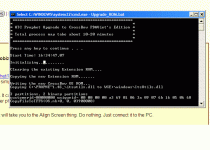
3. Khi sync ok, ở chế độ guess cũng được, bác mở thư mục ROM WM6 chạy file Upgrade_ROM.bat.
4. Lúc này sẽ hiện ra bảng up trên dos, bác nhấn phím bất kỳ...và lúc này đây cần sự kiên nhẫn...đợi khoảng 20phút là xong. Đừng sốt ruột rút cáp ra nhé!

5. Hãy relax và đón nhận WM6 chạy tít mù...
Chúc bác thành công!
***Nếu các bác có thời gian nghiên cứu thì có thể đọc kỹ cách hướng dẫn bằng tiếng Anh như sau:
How to upgrade from WM5 TO WM6
To upgrade your prophet to WM6 I recommend that you first of all downgrade to the NVID version of WM5 AKU2.2 and get the latest Active Sync:
1. Download the NVID(no vendor) AKU2.2 rom for WM5 here :
http://rapidshare.com/files/17208693...24721_NVID.exe
2. After it has been downloaded get the latest Active Sync from Microsoft.com
3. Install active sync, you might need to reboot
4. When your computer has rebooted, run the file from step No 1 . Follow the steps, remember that it can take some time and seem to stuck at 80% and higher, but just wait.
5. When you have done this, your pda will reboot. After it comes with the welcome to windows mobile screen,"Tap Here To Begin",JUST LEAVE IT. In fact don't touch your device before the next steps are finished.
6. Now download one of the WM6 versions(
http://forum.xda-developers.com/show...85&postcount=1 )
7. Now find a file named Upgrade.bat,and run it.(you don't have to run Step1 of PdaMobiz or #!#!#!#!#!#!#! Temp,as you have already downgraded to AKU2.2)
8. Wait until the upgrade finishes(usually takes 12-15minutes)..WAIT WAIT WAIT
9. A message will be displayed in the dos box,and it will say that the upgrade is finished etc....etc...,now you HAVE to HARD RESET,to finish the upgrade and enjoy you new WM6!
How to downgrade from WM6 TO WM5
The downgrade process from WM6 to WM5 is pretty simple. All you have to do is to downgrade to WM5 NVID and after that upgrade to the WM5 you want:
1. Download the NVID(no vendor) AKU 2.2 rom for WM5 here :
http://rapidshare.com/files/17208693...24721_NVID.exe
2. After it has been downloaded get the latest Active Sync from Microsoft.com.. Simply search for "Active Sync"
3. Install active sync, you might need to reboot
4. When your PC is ready run the NVID file you downloaded in step1 and follow the guide, remember that it can take some time and seem to stuck at 80% and higher, but just wait
5. When its done downgrading to the NVID WM5 rom, you prophet will reset and you can upgrade to the version of WM5 you want.
NOTICE
If you use a different AKU 2.2 ROM(like #!#!#!#!#!#!#! Temp),you may have two EXEs in the folder you extracted.Be careful and use the one that is made for your device:
FILENAME G3.EXE
is for G3 devices:IPL x.xx.0000, SPL x.xx.000.0 (this is shown when you reset)
FILENAME G4.EXE
is for G4 devices:IPL x.xx.0001, SPL x.xx.000.1 (this is shown when you reset)
RECOVERING FROM ERROR IN STEP 8 WM5->WM6
1. Don't panic
2. Don't panic
3. Unplug the phone
4. Reset with stylus,and keep the Camera Button pressed.
5. A 3 color screen will appear(Bootloader Screen)
6. Connect your device with your PC,and run the NVID(no vendor) WM5 rom.
7. The device will be resetted after RUU(rom update utility)finishes
8. Repeat the WM6 upgrade,from STEP 5..
How to switch or upgrade/downgrade between WM6 versions(for example #!#!#!#!#!#!#!->Trueneytral)
1. First you have to downgrade to WM5 AKU2.2 using the WM6->WM5 guide(some say that you don't have to do that,but i believe that it's better to downgrade first rather than making a simple overwrite)
2. Now follow STEP 5 of the WM5->WM6 guide





 . Thấy Bình bảo đã up thành công và chạy rất ổn nên muốn Bình chỉ giáo cho tớ. Cám ơn nhiều!
 . Thank!