Rất nhiều phần mềm hữu ích , link rapidshare, hầu hết là bản full

iRecordMax v7.1.4 (02/09/2008)

iRecordMax v7.1.4​


Digital perfection for all recordings with the most-sold music-restoration software in the world.
iRecordMax Sound Recorder All-in-one solution for all your audio needs!

Import & Record
iRecordMax is your universal recorder for any medium; transfer your favorite records, tapes, and all other audio media quickly and in perfect quality. One click, and recording is on.
You can also record streaming audio, Mic input, Line-in input, Quick Time, Real Player, Flash, games, as well as CDs and DVDs. Recorded sound can be saved in wav-file format, mp3 format, OGG format or WMA format.

Cut, edit, master
iRecordMax is your complete audio solution. Use it to perfectly cut, copy, master, and edit all of your recordings in detail.
Do you play an instrument? iRecordMax can create finished productions that sound just like store-bought CDs from your solo recordings! Thanks to the easy handling, everything takes place as if by itself, and no prior experience is necessary!
iRecordMax is also the first choice for adding audio effects like amplify, compressor, delay, equalize, fade in and fade out, flanger, invert, normalize, phaser, reverb, reverse, silence, stretch, vibrato, etc.

Burn & Export
To enjoy your complete music collection consisting of LPs, cassettes and other audio media digitally via your CD player, simply burn your recordings at the click of a button to CD & DVD.
If you like things to be compact, iRecordMax offers you an especially practical solution: Up to 10 hours of music can be burned to CD in MP3 format!
With the help of the export function, you can experience your music collection on the go – on your cell phone or MP3 player!


home.gif
Homepage-Trang Chủ

Size : 9.44 MB


down.gif
Download-Tải về

Serial :
Code:
KGFVY-7733B-8WCK9-KTG64-BC7D8
 
MediaChance EditStudio v6.0.5 (17/10/2008)


MediaChance EditStudio v6.0.5


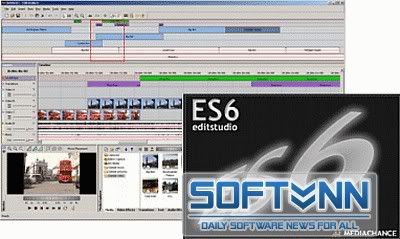
EditStudio PRO is different from many other video editing applications in this price range. It is a full video editing package with standard windows interface, professional quality tools and results. It is a flexible tool that offers all types of standard and advanced video capturing, editing, MPEG2 encoding and Subtitling in one package.

High-Quality MPEG-2 encoding

Because EditStudio uses one of the most advanced Mpeg-2 encoder, it is a great companion for DVD authors and will let you produce highest quality DVD files.
The Advanced MPEG settings allows you to tweak every aspect of the encoder - something you can't find in many other encoders or editors.

Fresh and Clean Video Editing Approach

You will soon discover one of the EditStudio strongest feature - the unlimited stackable effects and transition layers.
Instead of applying the effect directly to a video track, you can use the effect tracks instead.

This makes handling the project much easier and much more visually oriented than in other applications. It is easy to position the effect to the exact frames without splicing the video. It is easy to move the effects or resize them in timeline or even copy and paste them without touching the video tracks!
And you can even add key-frames to the Effects themselves, allowing for example for smooth transition from one color correction setting to another.

Add Subtitles and Chapter Marks

Adding frame accurate subtitles using subtitle Marks is now much easier with EditStudio PRO. You have the benefit of hearing and seeing the exact scene and the audio. The subtitles are also displayed on the Preview monitor during playback, making it easy to evaluate the timing. Then at the end you will just export them as *.SUB files that you can use in DVD-lab PRO or other professional DVD authoring application.


Easy to use, innovative Multi-Camera Editing
Thanks to the EditStudio unique layered Effects, multi-camera editing uses very clean approach. No splicing and dicing of your videos. The switching between different cameras is done right on the Effect layer, without actually touching any of your synchronized videos. And adding transitions between the cameras is equally simple, just add it over the cut on the Transition Layer!


PRO Tools as well
You will be surprised to find many professional tools such as Vectorscope, Waveform, RGB Parade, Tone and Bar generators, IRE safe Colors, 3-point Color correction, Chroma/Luma-key, Quick Matte etc.


Most affordable full featured application

There are many video editing applications, but few are both affordable and offers such a strong list of professional features.

Because of our price policy, EditStudio PRO is very affordable. Even if you already own any other Video Editor, you will greatly benefit from the other EditStudio features such as enhanced MPEG encoding capabilities or Subtitle editing. And at the end you will probably find EditStudio more enjoyable than the editor you are currently using.


Features

EditStudio Pro supports many advanced features:
  • Unlimited Composition layers for Video, Text, Audio and Effects
  • Key-frame editing
  • 3 point colour correction; this provides advanced color correction and color matching
  • Digital photo quality levels and curves controls
  • Chroma and Luma Key
  • Vectorscope, Waveform and RGB Parade scopes
  • AVI, MPEG-2, MPEG-1, HDV HD1, HD2, Windows Media and QuickTime export
  • Editing enhancements: autoripple, cut out, trimming in timeline, delete space, auto audio crossfade
  • Audio manipulation - 5 band equalizer, speeding, slowing
  • Adding Subtitles
All the expected Editing Tools
You can trim items directly on timeline with support for slip editing, to retain the items running time. Interactively adjust audio volume, balance and pan via rubberbands. Version 6 adds easy J and L cuts for linked items.

Composing Features
Interactively drag to move and resize the bitmap or video placement to create dynamic picture-in-picture or motion effects (ie. the "Ken Burns- effect)
Motion paths can include mixture of linear and spline curves. Objects can be moved and resized by dragging with the mouse or entering coordinate values for accurate placement with instant feedback.

Effects & Transitions
There are not many other applications that come already with such a great variety of pro-grade effects. Chroma Key, Luma Key, Realistic Old Film effect, Flare, Color and Gradient filters, Route Tracer for animated routes or graphs, Knock Out for removing on-screen text or graphics and much more. Effects can be applied also only to a circular or rectangular region of frame. For example you can blur out a face of a person and then keyframe the blur region to move with the person.
There are also many user customizable transitions, over 100 transitions are provided, more available through Herb Garden.

Text and Titling
Very few packages come close to the text functionality of EditStudio. Titles supports stationary text, as well as scrolling text, credits and crawling motion with many motion presets. You can mix fonts and styles, outline, glow or drop shadow. But that's not all! Letters of title can ripple, twist, come to screen one after another or use staggered effect. You can also insert a special purpose tag that can display a counting timecode or frame number (for example for creating production copies)

Keyframes
Here we go to the area where only true professional packages will let you. You can set key-frames for frame (video, image) placement, audio and many effects, then edit key-frames directly on the timeline. Linear, step and spline interpolation types are supported, along with ease in / out acceleration.

Capture
EditStudio has integrated analogue and DV capture with automatic scene detection using optical or DV timestamp methods. Also you can preview directly into DV device.


The Benefit

Fast, real-time preview
Even with mpeg-2 files used as an input the software is fast.

No non-sense effects
The vast number of built-in effects are all made to be used in the real life. You will find lots of useful color, balance, fade, flare, key, matte and other effects.

MPEG-2, HDV HD1, HDV HD2 and DVD ready
You can both input and output MPEG-2 DVD files, because in the price is included MPEG MainConcept based encoder/decoder to read and write MPEG-2 and MPEG-1 files. You can also export to HD1 and HD2 MPEG files.


Minimum System Requirements
  • 500 MHz Pentium 2 processor, or above (DV/DVD-size editing)
  • 256 MB RAM
  • Windows XP
  • Graphics card capable of 1024x768 resolution, full colour
  • Sound card

home.gif
Home page - Trang chủ

Size: 27.5MB

down.gif
Download - Tải về (S864)
 
REAPER v2.52

REAPER v2.52​


REAPER là một ứng dụng Windows mạnh mẽ và hợp lý được thiết kế cho ghi âm, sắp xếp, biên tập, pha trộn và trình diễn âm nhạc. REAPER cung cấp một giao diện linh hoạt và dễ sử dụng gần như phù hợp với nghiệp dư và chuyên nghiệp.

Những tính năng chính:
• Dễ sử dụng
Đều hữu dụng cho những người dùng theo sở thích hay chuyên nghiệp. Chỉ đon giản là kéo và thả một trong số các loại file vào trong để biên tập, hoặc chèn một track vào và trang bị cho nó để tiến hành thu âm. Không cần thiết đặt project xác định hay phức tạp.

• Cực kỳ nhỏ
REAPER có đầy đủ chức năng, nhưng bộ cài của nó chỉ hơn 1MB một chút. Khởi động và đóng nhanh, có thể dễ dàng cài đặt vào hệ thống mới hay ổ di động.

• Khả năng biên tập nhanh và mạnh
Chia cắt, đổi cỡ, fade/crossfade, độ thăng trầm, căng thời gian, copy/paste và lặp các mục nhạc với tẩy xóa. Có thể biên tập trên dải sóng âm.

• Năng lực làm việc vô địch
Gửi các track vào bất cứ track nào khác hay đường ra phần cứng, với rất nhiều lựa chọn (pre-fx, post-fx, independent faders, mono or stereo). Không thích thú vì công cụ advanced routing? Bạn không bắt buộc phải sử dụng nó (và chắc chắn nó không cản trở bạn).

• Tùy chọn thu âm mạnh mẽ
Hỗ trợ pre-fx, post-fx recording, có thể thu những âm thanh hỗ tạp từ nhiều track, etc, hỗ trợ chuyển đổi chế độ thu đầu vào nhanh chóng, lựa chọn kiểm soát đầu vào (kèm theo chế độ tự động kiểm tra đầu vào tape-style), hỗ trợ auto-punch-in/punch-out và nhiều nữa. Nếu bạn muốn, theo cách khác, nó thể hiện như những gì bạn mong đợi.

• Khả năng mở rộng
Đúng mực, có thể đọc, có thể biên tập định dạng file project. Hỗ trợ cho quá trình đọc và viết các định dạng file phổ biến. hỗ trợ cho biên tập củng cố các track và phác họa nguồn track, để dễ dàng truy xuất cho các ứng dụng khác. EDL import/export cho Samplitude và Vegas.

• Hỗ trợ MIDI
Hỗ trợ cho file MIDI, thu MIDI, và VSTi/DXi softsynths. MIDI có thể liên kết và phối hợp với audio.

• Giao diện người dùng có thể tùy chỉnh
Sắp đặt giao diện người dùng với color themes: làm cho REAPER đẹp như ý muốn, và sắp xếp (hoặc ẩn) các yếu tố của giao diện để phù hợp với nhu cầu.

• Hiệu ứng gộp và hỗ trợ 3rd party plug-in
Hiệu ứng cài đặt sẵn kèm theo bao gồm một bộ nén, cổng, FFT EQ, một số nhạc cụ điện tử cơ bản, các hiệu ứng Jesusonic, và hỗ trợ nhiều plug-in (bao gồm VST và DX plug-in) với bộ full plug-in sẵn có.

Yêu cầu cấu hình sau :03:
Recommended system: Multiple processors, Windows 2000/XP/Vista with 1GB RAM, >1GB free disk space, 1280x1024 in 16.7M colors, ASIO sound drivers

Minimum system:
500mhz processor, Windows 98/ME/2000/XP/Vista with 128MB RAM, 10MB free disk space, 800x600 in 256 colors or higher, Windows compatible sound hardware


home.gif
Homepage-Trang Chủ

Size : 3.4 Mb


down.gif
Download-Windows (3.4MB installer)

down.gif
Download-BETA: Windows x64 (3.4MB installer)

down.gif
Download-BETA: OS X Universal (7.9MB DMG)

key.jpg
Thuốc-Keygen
 
Ashampoo ClipFinder 1.47 (21/09/08)


Ashampoo® ClipFinder
The search engine for the most important video portals

The Ashampoo ClipFinder knows the most important portals and can, analogue to a search machine, simultaneously pass on a quickly made search inquiry to all video portals. A few seconds later, the Ashampoo ClipFinder collects all hits in its program window in order to make the user curious with preview pictures.
  • Download films very quickly
    • The Ashampoo ClipFinder shows diverse information which fits each film in the results, including the length, the name of the film and its assessment. A click of the mouse is enough and the Ashampoo ClipFinder plays a film. It is however not a problem to transmit it completely to the hard drive. Then it is always available – and not only with an existing internet connection. Alternatively the link to a film can also be taken over in the favorite files and reactivated again from here at any time.
    • The Ashampoo ClipFinder proves to be very future-proof with all of its activities. Through an update function, it is possible at any time to expand the program by further video portals.
  • Video fun free of charge
    The Ashampoo ClipFinder is available to all video fans as a free full version. Through a one-time online registration, the program can immediately be released as an unlimited full version.
Highlights:
  • Finds online videos which fit a search word
  • Supports the popular video portals YouTube, VideU, MyVideo, ClipFish, Google Video, sevenload, Dailymotion, MySpace, Metacafe, Veoh, Livevideo.com, blip.tv, Yahoo! Video and IFILM
  • Preview of all hit videos directly in the program window
  • Shows the length, assessment and name of the videos
  • Playing the videos directly in the Ashampoo ClipFinder
  • Download of the videos in the FLV format on your own hard drive
  • Your own favorite videos will be taken over in a separate favorites file
  • Skins change the looks of the Ashampoo ClipFinders

home.gif
Home Page - Trang Chủ

Size : 3.37 Mb

down.gif
Download - Tải về

key.jpg
Đăng kí Key bản quyền miễn phí
 
Music Label 2009 v15 (11/10/08)

Music Label 2009
Công cụ của những người sưu tập âm nhạc thực thụ


Since its initial release in 1994, Music Label lets you catalog your music collection(s) with ease. With powerful CDDB2 support, there is no need to manually type in data... Simply insert the CD and Music Label will do the rest. It can also scan your drives for digital music files.
  • Catalog Your Collection Automatically
    All information about your music is downloaded from the Internet. Music Label use CDDB2 which means a wide variety of data is downloaded (including cover art).
  • One-Click Sort & Search
    Sorting your database is as easy as clicking a button. When you search, the results are displayed as you type. Advanced sort and search in several levels is also available.
  • Keep Track of Loans
    Make sure you never lose a CD again by easy-to-use loan management.
  • Print Reports and Export Your Data
    Printing and exporting your data is only one mouse-click away. The Professional Edition also enables you to create your own reports (or edit the existing ones).
  • Manage Multiple Collections
    You can can create any number of databases and keep them separate.
  • The Most Reliable Solution
    Music Label is built on a solid client/server database which means your collection can grow to virtually any size.


Benefits:

  • Save time - no typing required
  • Save money - never buy duplicates
  • Save more money - never lose a CD on loan
  • Know where your music is located at all times
  • Finding those golden oldies becomes a breeze
  • Get the full picture with statistics and reports
Features:
  • Available in several different languages
  • Catalog any media (CD, MP3, vinyl, etc..)
  • Easy yet powerful search and sort
  • Export your collection to Excel, XML, HTML, etc
  • Transfer files to your portable MP3 player
  • Keep track of loans and wanted items
  • Find duplicates in your MP3 collection (to save disk space)
  • Auto-catalog your home made CDs using CD-Text
home.gif
Home Page - Trang Chủ

Size : 11.15 Mb


down.gif
Download - Tải về

key.jpg
Crack - Thuốc (S1021)
 
Aurora Media Workshop 3.4.15 (09/10/08)


Aurora Media Workshop 3.4.15 (09/10/08)

Chương trình đa năng đa dụng và đa hệ: chỉnh sửa, play, tách (âm thanh, hình ảnh từ các file video), chuyển đổi qua lại giữa các định dạng video và audio, làm "đạo diễn" chế tác các bức ảnh yêu thích của mình thành 1 bộ phim với các hiệu ứng "vừa đủ sài" => một phần mềm không thể thiếu.
Hỗ trợ : AVI,MPEG1,MPEG2,ASF,WMV,VOB,DAT ,DivX,Xvid

Các chức năng chính:

Video:
  • Tốc độ chuyển đổi cực nhanh.
  • Hỗ trợ ,MPEG1,MPEG2,ASF,WMV,VOB,DAT ,DivX,Xvid
  • Chuyển đổi, nhập hoặc tách tất cả các dạng file Video sang MPEG1
  • Hỗ trợ chuyển đổi, nhập hoặc tách tất cả các dạng file sang MPEG2
  • Hỗ trợ chuyển đổi, nhập hoặc tách tất cả các dạng file sang VCD,SVCD,DVD(PAL,NTSC)
  • Hỗ trợ chuyển đổi, nhập hoặc tách tất cả các dạng file sang AVI(DivX,XviD, MPEG-4)
  • Hỗ trợ chuyển đổi, nhập hoặc tách tất cả các dạng file sang Windows Media Format (WMV/ASF)
  • Nhập các Video file nhỏ thành một file lớn và ngược lại bạn có thể tách chúng ra.
  • Tách âm thanh ra khỏi tất cả dang file video ra mp3, wma, wav…
  • Tách hình ra khỏi Video bạn thích
  • Chạy file Batch.
  • Tạo nhạc nền cho những hình ảnh ưa thích của mình với những hiệu ứng tuyệt đẹp.
  • Hỗ trợ chỉ định “mở màn” và “hạn màn” trong lúc chuyển đổi hoặc ghép film.
CD:
  • Chép MP3, WAV ra đĩa CD
  • Backup files và thư mục ra CD
  • Chép MPEG1, MPEG2, VCD, SVCD, DVD ra CD để xem bằng đầu VCD hay DVD
AUDIO:
  • Chép MP3, WAV ra đĩa CD và chuyển đổi sang các mặc định WAV, MP3, WMA, OGG
  • Ghi âm từ tất cả các nguồn
  • Rip nhạc từ CD ra các dạng WAV, MP3, WMA, OGG
  • Chép WAV, MP3 ra CD
  • Chuyển đổi Batch Audio
  • Set format của các file MP3, WMA, WAV, OGG
Dịch bởi mrbun - softvnn.com


Aurora Media Workshop is a program that includes all the media tools, all in one.


Aurora Media Workshop is such a kind of program that includes prefessional features in Video, Audio, and Compact Disc media. With Aurora Media Workshop you can convert, edit, join, split, between nearly all types of video files, you can extract audio tracks, pictures from video files, can make any favorate pictures and photos to video films with fascinating transition effects and graceful background music.

You can record audio from any audio source, and convert audio files between mp3, wav, wma, ogg and you can also ripper and save your favorate music CD albums to disk audio files; you will find it is a very easy thing to store all kinds of audio, data, video files to CDs.

Features:

Video Capabilities:
  • Extreme fast Conversion speed
  • Supports AVI,MPEG1,MPEG2,ASF,WMV,VOB,DAT ,DivX,Xvid
  • Convert, join, split all supported formats to MPEG1
  • All supported formats to MPEG2
  • All supported formats to VCD,SVCD,DVD(PAL,NTSC)
  • All supported formats to AVI(DivX,XviD, MPEG-4)
  • All supported formats to Windows Media Format (WMV/ASF)
  • Join video files to a large one
  • Split large video file to smaller clips
  • Extracts audio tracks from all supported video formats to mp3, wma, wav
  • Extracts images from all supported video formats
  • Batch file execution
  • Make any favorate pictures and photos to video films with fascinating transition effects and graceful background music
  • Specifies start and end position while convert and joint
CD Capabilities:
  • Burn MP3, WAV to music CDs
  • Backup files and directories to CDs
  • Burn MPEG1, MPEG2, VCD, SVCD, DVD to CDs that can be played in VCD, DVD player
Audio Capatiblities:

  • Burn MP3, WAV to music CDs Audio conversion between WAV, MP3, WMA, OGG
  • Audio Record from all source
  • Advanced audio CD Ripper to WAV, MP3, WMA, OGG
  • Advanced audio CD burning from WAV, MP3, formats
  • Batch audio files conversion
  • Advanced MP3, WMA, WAV, OGG format setting

home.gif
Homepage-Trang Chủ

Size:13.4MB

down.gif
Download-Tải Về

key.jpg
Keygen

Code:
Name: AuroraSerial: 30b4aa04-d969b699-cac3ae3e-eaaaecf0-e304951d-da4d2663-bbd6b737-4f8e415aName: MediaSerial: a99c0865-af7e63c9-d0ecebc0-2ab77623-9a8ca084-a426fbe0-ac7b3d4b-08f20004Name: WorkshopSerial: 35ce2873-7fe06cd7-40d04999-d459cf01-98c4a40c-f2e7c55a-e4073c32
 
MP3 Key shifter v3.3 Full (04/09/2008)
MP3 Keyshifter 3.3


Với phần mềm MP3 KeyShifter, bạn có thể làm cho một file nhạc đệm phát ra cao hay thấp hơn, nhanh hay chậm hơn, phù hợp với chất giọng của mình để hát theo (và ghi ra thành một đĩa audio CD nếu muốn...).

Hiện nay với chiếc máy tính của mình, bạn có thể dễ dàng tự thu một CD mang tiếng hát của mình có nhạc đệm hẳn hoi. Các bản nhạc beat (nhạc đệm, tựa như karaoke) có vô số trên mạng, việc sử dụng một chương trình thu âm cũng không quá khó. Vấn đề duy nhất còn lại là ở giọng hát của bạn: các bản beat sẵn có không phải lúc nào cũng phù hợp với “tông” giọng của bạn. Nếu bạn hát ở các quán karaoke, có thể điều chỉnh dễ dàng với các chức năng tăng giảm tempo và cao độ của đầu máy phát. Nếu sử dụng các bản beat trên máy tính, bạn có thể sử dụng phần mềm MP3 KeyShifter giới thiệu trong bài viết này.

Chương trình có giao diện đơn giản, bấm Open để mở file nhạc (mp3 hoặc wav), Play để bắt đầu chơi, trượt thanh Key để thay đổi cao độ (tone), trượt thanh Tempo để thay đổi tốc độ nhanh chậm. Khi đã ưng ý, chọn Save để lưu lại dưới dạng mp3 hoặc wav.


Trang chủ:

Link Download:
 
TextAloud v2.285 (18/05/2008)

TextAloud


Convert any text into voice and MP3 for PC or download to MP3 player
TextAloud is the leading text to speech program, available with exciting premium voices (including several languages) from ATT, Cepstral and NeoSpeech for the best in computer speech for your PC. TextAloud uses voice synthesis to convert text into spoken audio. TextAloud reads text from email, web pages, reports and more, aloud on your PC. TextAloud can also save your daily reading to MP3 or Windows Media files ready for playback on your iPod, PocketPC, or even on your TV with Tivo's Home Media Option.


What you can do with TextAloud:

• Sit back and relax while your PC reads to you
• Save text to MP3 for portable audio players
• Proofread your own writing
• Listen to that report while you're on the treadmill
• Find help for someone with a reading disability
• Create messages for your answering machine
• Reduce eye strain from too much reading
• Listen to information while you work on something else
• Take some reading along for your daily walk or run
• Turn your iPod into a tax write-off
• Listen to an eBook during your commute
• Study English as a Second Language
• Help a senior citizen or someone with low vision
• Add some spice to your PowerPoint presentations
• Find a great new tool to study for exams
• Listen to text read in other languages
• Amuse your kids by letting your PC read stories to them
• Create audio files for computer games
• Prepare for a big speech by hearing your words read aloud

Features at a glance:

• Single-Article and Multi-Article Mode for listening to articles one at a time, or building a playlist to listen to later.
• Load articles using the Clipboard, Document Import, Hot Keys and Drag and Drop.
• Support for Word, PDF and HTML documents.
• Support for multiple Text-To-Speech engines, including international voices.
• Support for WAV, MP3 and WMA audio files.
• Proofread tool for listening to documents as you proofread.
• Plugin toolbar for Internet Explorer to listen to web pages.


OS: Win 95/98/ME/NT/2000/XP/Vista

home.gif
Home Page

Size: 3.19 mb

down.gif
Download-FullVersion
 
Wondershare Movie Story v4.5 (30/09/2008)

Wondershare Movie Story v4.5​


Tạo album Video ảnh nghệ thuật

The best slideshow software for reliving your memories
Gather up your favorite photos and videos, combine with music, easily create a unique and personalized photo slideshow for any occasion. Explore the fun of making your own movies.

Easily combine photos, videos and music
Drag & drop your digital photos, videos and music into a vivid movie story, edit photos, add transition effects, set the timing and you're done in a few simple steps.

Match every occasion with DVD menus
Do you take most of your photographs when on holidays or at festive events? We've been working on how to get the very best out of your photo memories by adding transition effects and
DVD menus that match the occasion perfectly.

Experience perfect home cinema
Create a unique and personalized movie and burn the content directly to a DVD for watching on your big TV with family and friends. Impress with amazing outputs and experience the advantages.

System Requirement:

  • OS: Win 2000/XP/2003/Vista
  • CPU: Pentium III/Athlon 500MHz or above
  • RAM: 256 MB or above
  • Hard Drive(s) Size: 50MB Free Space or above


home.gif
Homepage-Trang Chủ

Size : 28 MB


down.gif
Download-Tải về

key.jpg
Thuốc-Patch
 
SmartSound Sonicfire Pro 5.0 (30/09/08)

SmartSound SonicfirePro is the first-ever royalty-free music solution with "Mood Mapping" for dynamically matching the mix and feel of music to the changing moods of any production. Built with SmartSound’s patented technology, Sonicfire Pro gives visual storytellers unprecedented control and flexibility over their music scores resulting in unlimited creative options right from their video editing workstation.

With a new multitrack mixing interface and added support for the latest SmartSound Multi-Layer Music, editors can orchestrate sophisticated music tracks that would otherwise require a professional music editor or composer. The intuitive design of Sonicfire Pro delivers instant access to professional music mixing and editing results while keeping advanced features easily accessible for complete control of your music score.


home.gif
Home Page - Trang Chủ

Size : 234.83 Mb

down.gif
Download - Tải về

key.jpg
KeyGen - Thuốc (S689)
 
FLVPlayer4Free 3.2 (27/09/08)


FLVPlayer4Free
- Free FLV Player is a useful utility designed to help yo view your preferred flv clips.

FlvPlayer4Free is a greatly improved solution that allows even the most demanding users to easily play their favourite FLV files in the hard disk or from internet.

Here are some key features of "FLVPlayer4Free":
  • Drag & Drop: drag your FLV file and drop it into FLVPlayer4free main window
  • Save frame as image (JPG, PNG, BMP)
  • Multi language: easily create/turn into your language
  • Full Screen for a wider image
  • Fully Resizable window
  • Always on top to keep an eye on it anytime
  • Handy volume commands and mute option
  • Remember last settings
  • Auto hide control and mouse cursor on full screen
  • FLV Association
  • Useful autoplay and autorepeat
  • Practical Play, Pause, Rewind, Fast forward and Seeking bar buttons
  • Elapsed and total time always displayed to keep them under control
  • Multi instance which allows you to run muliple FLV files at the same time
  • FLV information always available

home.gif
Home Page - Trang Chủ

Size : 2.35 Mb

down.gif
Download - Tải về
 
Guitar Pro v.5.2.1 Final (24/09/08)


Guitar Pro v.5.2.1 (24/09/08)

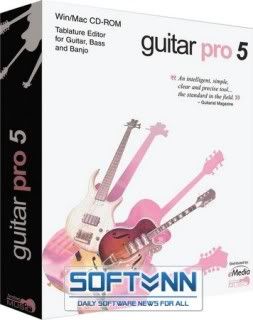
Guitar Pro là một ứng dụng đa năng trong việc biên tập cho guitar, banjo và bass.Ngoài việc soạn nhạc, Guitar Pro còn là một công cụ toàn diện dành cho những người thành thạo cũng như những người mới chơi trong việc rèn luyện,biên soạn bản nhạc,hoặc đơn giản là hòa âm phối khí.

Đặc tính Guitar Pro:
  1. Mạnh mẽ,đơn giản và trực quan. Guitar Pro giúp bạn soạn nhạc cho guitar, bass hoặc bất kì một dụng cụ nhạc lý có dây nào chỉ trong vài phút.
  2. Xem và nghe những khúc nhạc của bạn.Xa hơn nữa,, Guitar Pro cho phép bạn theo dõi và nghe thử những nốt nhạc với những điều kiện tốt nhất.
  3. Một môi trường làm việc lý tưởng cho người chơi guitar. Guitar Pro bao gồm rất nhiều công cụ cho người chơi guitar như là sơ đồ âm các dây,hệ thống chỉnh âm guitar,chỉnh nhịp, công cụ chia độ cho các khuôn nhạc...
  4. Nhập, Xuất dữ liệu và Chia sẻ! Nhập và xuất dữ liệu ra định dạng MIDI và ASCII, và tận hưởng hàng chục ngàn những bản nhạc định dạng của Guitar Pro có sẵn trên Internet.
Tính năng mới trong phiên bản Guitar Pro 5:
  • RSE [Realistic Sound Engine] mới với âm thanh trung thực của dụng cụ-nghe một số mẫu.
  • Giao diện mới.
  • 4 chế độ hiển thị:giấy,giấy da để in,màn hình thẳng đứng,màn hình nằm ngang.
  • Cuộn và phóng to tốt từ 30% đến 200%.
  • Cách hiển thị các nốt nhạc được thiết kế mới hoàn toàn(tương tự như các cuốn sách âm nhạc đã xuất bản).
  • Tự động định hướng và cách từng khoảng cho các kí tự nốt nhạc tránh sự va chạm tạo ra các khoảng trống.
  • Cửa sổ cài đặt mới
  • Tiêu chuẩn kí hiệu tiên tiến(hiệu ứng,âm thanh...)
  • Cấu hình bản thảo cho từng ca khúc(chỉ các khuôn nhạc,chỉ kí hiệu tiêu chuẩn hoặc cả hai,sơ đồ...)
  • Nhiều công cụ chọn lọc được sử dụng để soạn thảo và chơi nhạc.
  • Chơi một phần được chọn với nhiều sự lựa chọn(cũng làm việc ở chế độ chơi lặp lại).
  • Di chuyển các track lên và xuống.
  • Hỗ trợ giọng nói Voice Support (lead và bass)
  • Coda, Segno (đơn và đôi), Fine + 14 bước nhảy khả dĩ.
  • 8va, 8vb, 15ma và 15mb
  • Hiệu ứng bộ ba tới thanh bar (thứ 8 hoặc 16)
  • Cải tiến sự kết thúc xen kẽ.
  • Cải tiến ghi chú.
  • Khả năng thêm hiệu ứng vào các ghi chú bắt buộc.
  • Độ cong vá rung của tiếng đàn được mở rộng.
  • Hỗ trợ đầy đủ của biên pháp hòa âm nhân tạo.
  • Wah-wah
  • Lên đúng âm điệu cho một dụng cụ.
  • Sơ đồ hiển thị các nốt nhạc và/hoặc dưới tiêu đề.
  • Cải tiến về tốc độ
  • Nhập/xuất nhạc XML.
  • Nhập vào PowerTab.
  • TablEdit Import
  • Xuất ra định dạng PDF.
  • Cải tiến nhập/xuất định dang ASCII.
  • Xuất ra một trang hoàn thiện của BMP
  • Cải tiến và rút gọn xuất ra định dạng WAVE(dùng Windows(r) Mixer)
home.gif
Homepage-Trang Chủ

Size:11.21MB

down.gif
Download-Tải Về Bản Full(S031)

down.gif
Download - Realistic Bass

down.gif
Download-RealisticDrums

down.gif
Download-RealisticGuitar
 
Total Audio Converter 2.6 (4/6/08)


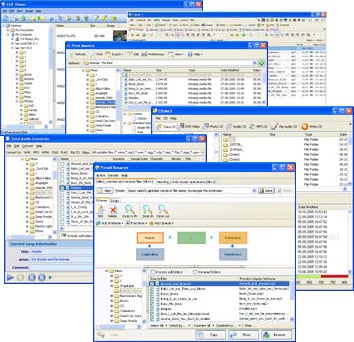
Total Audio Converter: The Ideal Audio File Format Converter Ask yourself what is a perfect audio converter for you? Supporting all audio formats? To be handled via command line? The one with built-in audio player and CD ripper? And sure easy-to-use? We have just the one you can dream of - Total Audio Converter.

You have 9 reasons to choose Total Audio Converter (no ad, just facts):

Batch conversion
Either you have one file or a hundred of them it will take you seconds to set the conversion process. Select the files checking checkboxes or just press Select All button.

Widest List Of Audio Formats Supported
Total Audio Converter supports more than 30 audio formats as source formats! You can convert files of almost any type with it. The target formats are WAV, MP3, OGG, WMA, APE, FLAC, MP4, AAC, MPC. Variable Bit Rate (VBR) is also supported. It's not an mp3 converter or ogg converter, it's all formats converter (note the price!). Total Audio Converter works with Vista as well.

Command line
Command line is a great thing to run your converter from within other programs. All command line parameters are described so even a beginner will master them in no time.

Rip CD
This option allows you to rip audio tracks from CD's and convert them to another format at the same time. Quite time saving!

Right-click option
Total Audio Converter integrates into Windows popup menu. Just select the file on your desktop and make a right mouse click. New option - Convert To - will be added to all normal commands.

Band needs .wav sample files to be converted into wma files for easier organization and it also helps streamline the overall music production. Google lead me to you guys and I am grateful for that. Thanks.

Built-in audio player
Total Audio Converter has built-in audio player. Now you can play your song before or after the conversion. Sometimes it's the best way to find the difference between formats.

No tech knowledge required
Total Audio Converter was developed to be handy. Intuitive interface makes it easy for everybody to be the master of audio conversions. Wizard of the program will ask you all the necessary questions. If you do not know what bit rate or frequency to choose it will automatically set the most appropriate.

Quality
Total Audio Converter is a high quality product. Those who ever tried any other tool from CoolUtils know that. You can try it out for 30 days for free to believe that. Just hit Download button and get Total Audio Converter for free with no obligations. Make your own opinion about the tool.

I needed bitrate reducing and mp3 converting for Motorola mobile. Googled for audio converters, tried lots of them and finally found this... didn't look for more

Price
No hidden costs! Our pricing is clear and concise. Once paid you get all the upgrades for free. Tech support is also free to registered users (sure we will answer all your questions even if you are using trial version of Total Audio Converter).

How it works
We have developed Quick Tour about Total Audio Conveter to show you how it works. View 3 minute clip and get the idea of the tool.

Ok, now when you've read a huge lists of features and benefits of Total Audio Converter you know the facts. What we are really proud of is the simplicity of our tool. As Albert Einstein once said everything should be made as simple as possible, but not simpler. That's what we had in mind developing Total Audio Converter. If you want to have the full picture of audio converters and are going to explore at least 5 more converters, please, take a look at our comparison of most famous audio converters here.

If you're thinking of looking around, bookmark us right now. We are sure you won't find a better value!

Supported Formats:

* MPEG Audio Layer format (MP3)
* Real Audio format (RA, RMM, RAM, RPM, RM, RMVB)
We recommend to install that codec to convert ra files http://www.free-codecs.com/download_...hp?d=1530&s=65
* WAVE audio format (WAV)
* OGG file format (OGG)
* Audio Tracks format (CDA)
* Monkey's Audio format (APE, APL)
* Musepack formats (MPC, MP+)
* Windows Media Audio format (WMA)
* Free Lossless Audio Codec format (FLAC)
* Advanced audio coding (AAC, M4A)
* MPEG-4 international standard (MP4)
* True Audio codec (TTA)
* OptimFROG (OFR)
* Speex (SPX)
* WavPack (WV)
* MOD music
(XM, IT, S3M, MOD, MTM, UMX)
* AdaptiveMultiRate (AMR)
* MO3 music (MP3/OGG compressed MODs)
* Musical Instrument Digital Interface (MIDI)
* TwinVQ (VQF)
* AU / SND,
* Paris Audio File (PAF)
* Commodore Amiga (IFF, SVX)
* Sphere Nist (WAV)
* IRCAM (SF)
* Creative (VOC)
* Sound forge (W64)
* GNU Octave 2.0 (MAT4)
* GNU Octave 2.1 (MAT5)
* Portable Voice Format (PVF)
* Fasttracker 2 (XI)
* HMM Tool Kit (HTK)
* Apple (CAF)

Key Features

o Converts almost all audio formats
o Changes bitrate or frequency
o Converts many files in batches
o Has a high quality 32 bit converter engine
o Has integrated audio CD ripper
o Command line
o Direct conversion without temporary files
o Built-in audio player
o Integrates into Windows
o Vista compatible


Size : 6,28 Mb

down.gif
Download-Tải Về bản full
 
Thanks bác nhìu ..

Nhưng giá bác cho thêm ít tiếng tiếng Việt hướng dẫn nữa thì tuyệt vì nh phần mềm em ko bít về công dụng lun .. hik..
 
Back
Top