
You are using an out of date browser. It may not display this or other websites correctly.
You should upgrade or use an alternative browser.
You should upgrade or use an alternative browser.
xin hướng dẫn về đổi font và màu font ipod
- Thread starter hoangmlp
- Ngày gửi
đây là cái hướng dẫn của nó :
"Open iPW, load your firmwire.
Go to Layout, scroll down to Font Types.
In that list, go down to item 24222.
Now look at the z2 tag. It should say 0xFF000000. Click on it and change the first three digit series from 00 00 00 to DD 00 00.
Go to the fontID tag, and click on it. On the right, click the "Decimal" select button.
Back to the left, in the editing textbox, type in the String ID for the font you want to change to. To find this, click the Strings tab and look for the list of fonts in Language Block 24. Pick one, and punch in the 5-digit number into the fontID tag.
Write your iPod, eject, and look. Your menu text is now red! However, you won't have the same font. This is currently the only way to change your menu font color."
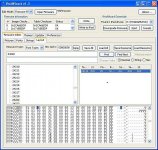
nhưng mà cái ipod của em khi bật ipw lên thì cái dòng z2 nó lại khác như trên,thông số không giống nên ko đổi được , cuối cùng là ...em chắng biết làm thế nào hết
"Open iPW, load your firmwire.
Go to Layout, scroll down to Font Types.
In that list, go down to item 24222.
Now look at the z2 tag. It should say 0xFF000000. Click on it and change the first three digit series from 00 00 00 to DD 00 00.
Go to the fontID tag, and click on it. On the right, click the "Decimal" select button.
Back to the left, in the editing textbox, type in the String ID for the font you want to change to. To find this, click the Strings tab and look for the list of fonts in Language Block 24. Pick one, and punch in the 5-digit number into the fontID tag.
Write your iPod, eject, and look. Your menu text is now red! However, you won't have the same font. This is currently the only way to change your menu font color."
nhưng mà cái ipod của em khi bật ipw lên thì cái dòng z2 nó lại khác như trên,thông số không giống nên ko đổi được , cuối cùng là ...em chắng biết làm thế nào hết
Đính kèm

Không ai rảnh mà làm ra FW dỏm đâu bạn à. Có lẽ trong lúc làm bạn sai bước nào rồi. Thử lại lần nũa xem sao.